I. Introduction
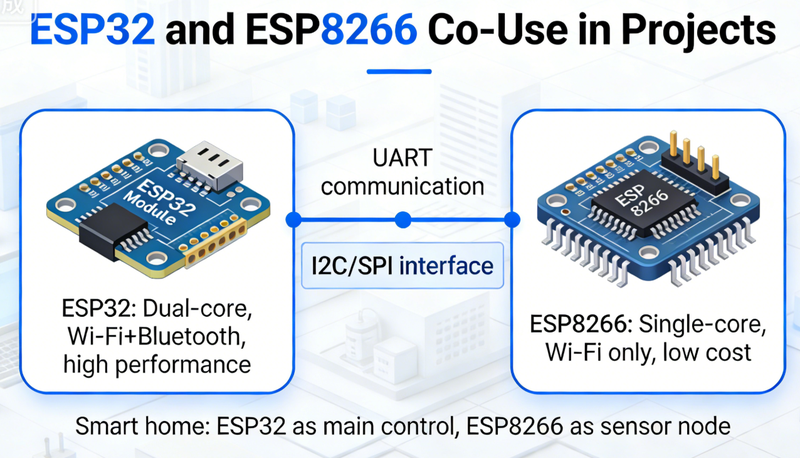
Interfacing ESP32 and ESP8266 in a project can leverage the unique features of both microcontrollers. The ESP32 offers powerful processing capabilities and multiple communication options, while the ESP8266 provides a cost - effective Wi - Fi solution. This guide will detail the steps and methods to interface these two devices effectively.
II. Hardware Setup
1. Power Supply
Voltage Compatibility: Both ESP32 and ESP8266 typically operate at 3.3V. It is crucial to ensure a stable 3.3V power supply for both devices. You can use a common voltage regulator, such as the LD1117 - 3.3, to provide a consistent power source. Connect the VIN pins of both ESP32 and ESP8266 to the regulated 3.3V output of the power supply.
Power Isolation: In some cases, especially when dealing with noisy power sources or high - power peripherals, it may be necessary to isolate the power supplies of the two devices using ferrite beads or inductors to prevent interference.
2. Communication Interface Selection
UART (Universal Asynchronous Receiver - Transmitter): UART is a widely used and straightforward communication interface for interfacing ESP32 and ESP8266. On the ESP32, you can use any of its UART ports (e.g., UART0, UART1, UART2). On the ESP8266, it usually has a built - in UART interface. Connect the TX (Transmit) pin of the ESP32 to the RX (Receive) pin of the ESP8266, and vice versa. Also, connect the GND (Ground) pins of both devices together to establish a common ground reference.
SPI (Serial Peripheral Interface): If high - speed data transfer is required, SPI can be an option. The ESP32 has multiple SPI interfaces, and the ESP8266 also supports SPI communication. Connect the SCLK (Serial Clock), MOSI (Master Out Slave In), MISO (Master In Slave Out), and CS (Chip Select) pins according to the SPI protocol.
I2C (Inter - Integrated Circuit): For applications where multiple devices need to be connected on the same bus, I2C can be used. The ESP32 and ESP8266 can be configured as either a master or a slave device on the I2C bus. Connect the SDA (Serial Data) and SCL (Serial Clock) pins, along with the GND pins.
III. Software Configuration
1. Choose a Development Environment
Arduino IDE: Both ESP32 and ESP8266 are well - supported in the Arduino IDE. You can easily install the necessary board packages for both devices. For the ESP32, you need to add the ESP32 board package URL in the Arduino IDE preferences and then install the ESP32 board support. Similarly, install the ESP8266 board support for the ESP8266.
PlatformIO: PlatformIO is another popular cross - platform development environment. It provides a unified interface for developing projects on both ESP32 and ESP8266. You can create separate projects for each device or use a multi - environment project to manage both.
2. Write Communication Code
UART Communication: In the Arduino IDE, you can use the
SerialorSerial1(depending on the UART port used) functions to send and receive data between the ESP32 and ESP8266. For example, on the ESP32 side:
cpp
void setup() {
  Serial.begin(115200); // Initialize UART communication
}

void loop() {
  if (Serial.available()) {
    char c = Serial.read();
    // Process the received data
  }
  // Send data to ESP8266
  Serial.println("Hello from ESP32");
  delay(1000);
}
On the ESP8266 side, the code is similar:
cpp
void setup() {
  Serial.begin(115200);
}

void loop() {
  if (Serial.available()) {
    char c = Serial.read();
    // Process the received data
  }
  // Send data to ESP32
  Serial.println("Hello from ESP8266");
  delay(1000);
}
SPI and I2C Communication: For SPI and I2C communication, you need to use the corresponding libraries in the Arduino IDE. For SPI, the
SPIlibrary can be used, and for I2C, theWirelibrary is available. The code for these communication protocols is more complex and requires a good understanding of the respective protocols.
IV. Testing and Debugging
1. Initial Testing
Serial Monitor: Use the serial monitor in the Arduino IDE to check the communication between the ESP32 and ESP8266. Set the baud rate in the serial monitor to match the baud rate used in the code (e.g., 115200). You should see the data sent from one device being received on the other device.
LED Indicators: You can also use LED indicators on both devices to indicate the status of the communication. For example, turn on an LED when data is successfully sent or received.
2. Debugging Common Issues
Communication Errors: If there are communication errors, check the wiring connections, baud rates, and data formats. Make sure the TX - RX pins are correctly connected and that the baud rates on both devices match.
Power - related Issues: Power - related problems can cause unstable communication. Check the power supply voltage and ensure that the power consumption of both devices is within the limits of the power supply.
V. FAQs
Q: Can I use other communication protocols besides UART, SPI, and I2C?
A: While UART, SPI, and I2C are the most common, you can explore other protocols like CAN (Controller Area Network) if your project requirements demand it. However, the ESP32 and ESP8266 may require additional hardware support for these less - common protocols.
Q: Do I need to change the code if I switch the communication interface?
A: Yes, you need to rewrite the communication - related code according to the new communication protocol. Each protocol has its own set of functions and libraries in the Arduino IDE.
Q: How can I improve the communication stability?
A: You can improve stability by using proper power supply, adding pull - up or pull - down resistors on the communication lines, and implementing error - handling mechanisms in the code.
VI. Conclusion
Interfacing ESP32 and ESP8266 in a project involves careful hardware setup, appropriate software configuration, and thorough testing and debugging. By following the steps and guidelines in this article, you can successfully connect and communicate between these two powerful microcontrollers in your projects.